Open-Sourcing imgt: The Image Optimizer Behind FASHN
We're open-sourcing imgt, the self-hosted image optimizer behind FASHN. Here's why we built it, how it works, and how to run your own on Cloudflare.
 Renan Ferreira9 min read

Today we're open-sourcing imgt, the image optimizer that serves images across FASHN.
imgt is a small, self-hosted service that runs on Cloudflare. Give it a public image URL and a width, and it returns a resized WebP image, stores it, and serves repeat requests from its cache. It already handles images for the FASHN web app, our mobile app and our internal tools. Now anyone can deploy it to their own Cloudflare account, under the MIT license.
What we're releasing
- The full service: the Cloudflare Worker, the Rust and libvips image service, and the caching layer we run in production, at github.com/fashn-AI/imgt
- One-click deployment: a Deploy to Cloudflare button that creates the Worker, the R2 bucket and the containers in your own account
- A drop-in Next.js loader: a copyable loader and configuration for
<Image> - Benchmarks and cost models: response times, failure counts and estimated monthly costs on the benchmarks page, including the cases where imgt is slower
- Docs for people and coding agents: architecture, configuration and deployment guides, plus a setup prompt you can hand to a coding agent
The rest of this post explains why we built it, how it works, the decisions that shaped it and the impact it had on FASHN.
Why we built it
FASHN is an image-heavy product. Every try-on, model swap and product-to-model run creates new images, and our users browse them in galleries, collections, the Agent chat and the mobile app. Each of those screens needs smaller copies of the same image: a thumbnail for a grid, a medium version for a detail view, and the original for downloads.
For a long time, Next.js image optimization on Vercel produced those copies for us. It worked well, but it is billed per image transformation and cache operation, and almost every image we serve is new. Our image optimization bill grew with every generation our users ran.
Image optimization services usually charge for three things: creating a resized image, storing it, and reading it from the cache. For a typical website, the first one is rare. A marketing site has a few hundred images, and each one is resized a handful of times.
FASHN is the opposite. Users create new images all day, and each new image needs several sizes. The number of transformations grows with usage, so the cost grows with it.
We wanted a replacement that:
- Works as a drop-in custom loader for Next.js
<Image> - Produces the same images, so users see no difference
- Runs in our own Cloudflare account, where we pay for compute and storage instead of per-image meters
- Can also serve the mobile app and other clients that are not Next.js
- Stays safe to expose publicly: only our image hosts, bounded sizes, bounded work
Why not Cloudflare Images?
imgt runs on Cloudflare, so the obvious question is why we didn't use Cloudflare Images. There were two reasons.
First, it has the same pricing model we wanted to leave. Cloudflare Images charges $0.50 per 1,000 unique transformations a month after the first 5,000, and every new image at every size is a new transformation. On the example workload in our benchmarks, a site creating 2 million new resized images a month, its transformations alone cost more than four times Vercel's estimate and about 18 times imgt's.
- imgtself-hosted on Cloudflare
- $55.32
- Vercelimage optimization
- $223.20
- Cloudflare Imagestransformations only
- $997.50
The example workload from imgt's benchmarks, not FASHN's traffic. imgt and Vercel are full estimates at list prices. Cloudflare Images counts only its transformations, at $0.50 per 1,000 after the first 5,000.
Second, we needed control over the encoder. Matching Vercel's output came down to a WebP encoder setting, and Cloudflare Images' only encoding options are the quality, the format and a fast compression mode.
Cloudflare Images works well when each image is resized once and then served many times. For a product that creates new images all day, running our own resizer on Cloudflare cost much less.
How it works
A client asks imgt for an image with three parameters: the source URL, a width and a quality.
GET /image?url=https://cdn.fashn.ai/…/result.png&w=640&q=77
The request passes through a few layers, and the more expensive ones only run when the cheaper ones cannot answer. Pick a request to follow it:
Follow one image request
Browser
next/image
Worker
validate
Workers Cache
edge
R2
resized images
Container
Rust · libvips
Origin
allowed hosts
MISS → fetch original → resize → store
Nothing is cached yet. imgt fetches the original while a container starts, and the container resizes it once. The WebP streams back and is cached at the edge, while R2 stores it in the background. The original is never stored.
- Worker gateway. Checks that the source comes from an allowed host, that the width and quality are valid, and applies a rate limit. Redirects from the origin are checked against the same allowlist.
- Workers Cache. An image already cached at the edge is returned without touching R2 or starting a container.
- R2. Resized images, never originals, are stored in a private bucket. An R2 lifecycle rule, which you add after deploying, deletes them after 30 days, and imgt recreates any that are requested again. When a stored image goes stale, imgt keeps serving it for up to a day while it refreshes in the background.
- Container. On a miss, a Durable Object (a single Cloudflare coordinator with its own state) sends the job to a Cloudflare Container running Rust and libvips. It resizes the image, corrects its orientation and encodes it as WebP.
The Durable Object also deduplicates work. If 50 people open the same new image at the same time, it is resized once and all 50 requests get the result.
Decisions that shaped imgt
Matching Vercel byte for byte
Our first requirement was that nobody should notice the switch. Next.js image optimization is built on Sharp, which uses libvips, so we started from the same library and tested encoder settings until our output matched Vercel's at the same width and quality.
The setting that mattered was the WebP encoder effort. With effort 4, all 1,400 comparable images in our live comparison matched Vercel's output byte for byte. Because the files are identical, we could keep every quality setting our apps already used.
From Sharp to Rust
The first version of imgt used Sharp in a Node.js container. Later, we rewrote the image service in Rust against the same libvips and codec versions. The output stayed identical, and the container used less memory and a little less CPU.
Every change to image output bumps a renderer version that is part of the cache key. A new encoder setting can never mix with images created by the old one.
Not re-encoding unchanged images
Cached images go stale based on the source's cache headers, with a four-hour minimum. When an image goes stale and its origin gave it a strong ETag, imgt asks the origin whether the original changed. If the origin answers 304 Not Modified, imgt renews the stored copy without downloading the original or starting a container. Generated images rarely change, so for origins that send ETags, these refreshes cost almost nothing.
One small container, plus one for bursts
We started with four always-on containers. Most of the time they sat almost idle, and Cloudflare reserves 3 GiB of memory for every CPU, so we were paying for capacity we only needed during bursts. Now imgt keeps one small container running and wakes a bigger one when work piles up:
- A primary container with 1 CPU, which handles normal traffic and sleeps after two idle minutes
- An overflow container with 3 CPUs, which wakes up when four jobs are waiting and sleeps again after 30 idle seconds
Watch the containers scale
Queue
new images
0 waiting
Primary
1 CPU
working
Overflow
3 CPUs
asleep
t = 0 sstep 1 of 9
Normal traffic. The primary handles it alone.
An illustration, not a benchmark. Each slot is one image in progress. A container takes three per CPU and encodes one image per CPU at a time.
This cut our container costs by about 60% at list prices. The catch is that large bursts of new images are slower, as the tradeoffs below show.
Bounded by default
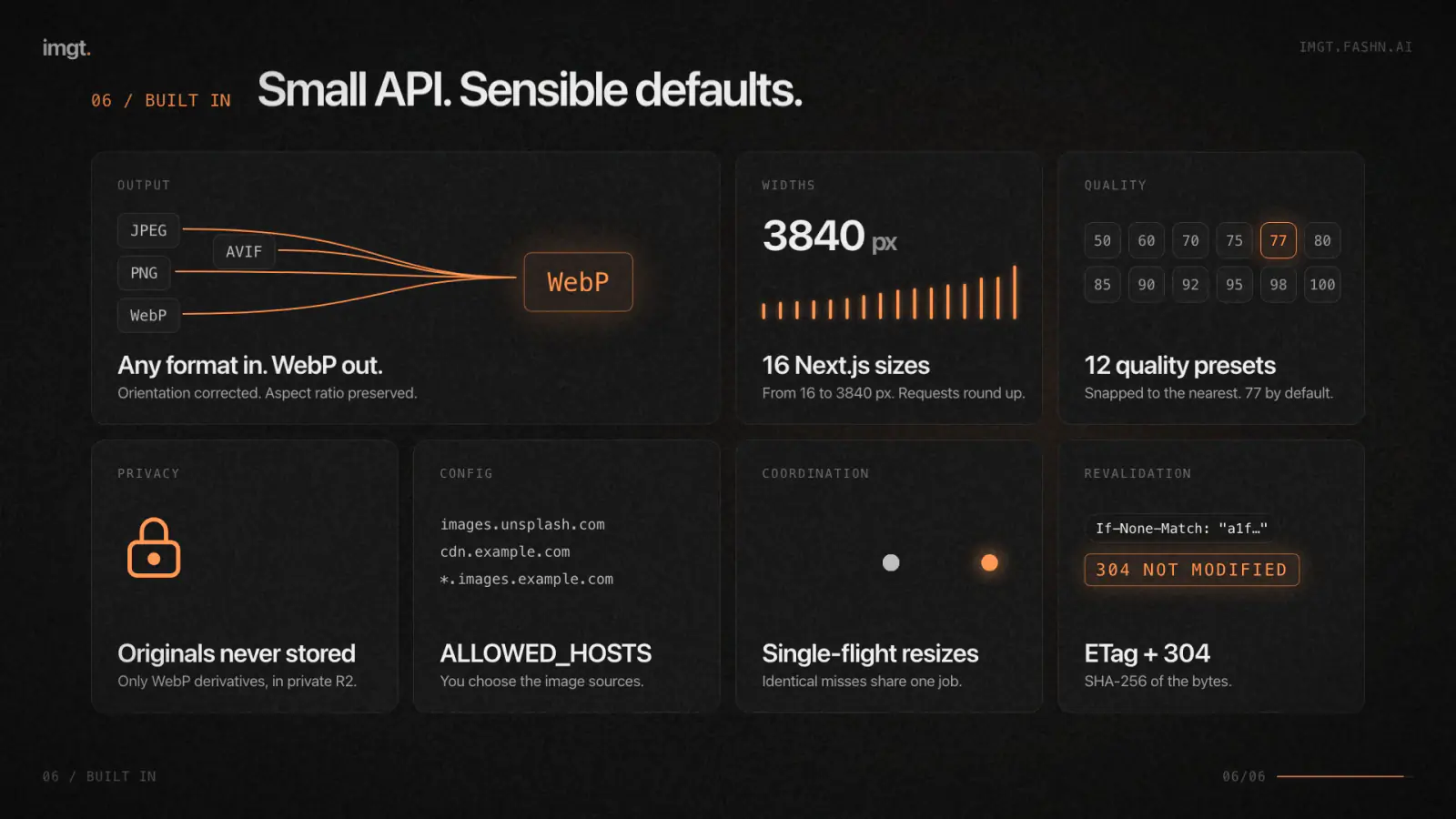
Before open-sourcing imgt, we made sure a public endpoint cannot be abused to create unlimited work. Widths round up to a fixed list (the same sizes Next.js uses by default) and qualities snap to a fixed list, so one source image can have at most 192 resized versions. Sources must be HTTPS, on an allowed host, under 100 MiB and 50 megapixels. Jobs have a deadline, and the coordinator caps how many can run or wait at once.
The impact
Lower costs
By our estimate at list prices, imgt, with its small container plus one for bursts, costs about 75% less than Vercel's image optimization would for the same images at our volume.
A better mobile app
Before imgt, most screens in our mobile app loaded original images. Some uploads are 12-megapixel photos, which take about 48 MB of memory each once decoded, only to be shown in a small square.
Now the gallery, the image picker, the Agent chat and the conversation thumbnails all load previews sized for the screen. In an iOS Simulator test with three 12-megapixel chat attachments, peak memory fell by about 13%. The same change also fixed how chat video previews were rebuilt. When a preview is available, the detail sheet and full-screen viewer show it while the original loads, instead of an empty screen. The preview usually comes from the local cache.
The chat requests the same width and quality as the gallery tiles, so an image seen in both places downloads and caches once.
One optimizer for everything
The web app, the mobile app and internal tools now share one image service with the same cache. Any new client that can build a URL can use it.
Tradeoffs
imgt is not faster than Vercel in every case. These numbers come from separate benchmark runs with different source images, so treat them as a rough comparison. For steady traffic, the two are close: at 20 new images per second, both had a p95 response time of about 1.3 seconds or less. Cached images returned at a p95 of about 0.2 seconds.
Bursts of new images are slower. imgt keeps only one small container awake, so when many new images arrive at once, like someone opening a gallery of fresh results, they wait while the burst container starts and works through the queue. Cached images are not affected. We tuned imgt for our own traffic, where bursts are short and most requests hit the cache, and the savings were worth the slower bursts. If your traffic looks different, you can change the container sizes and when the burst container wakes, or turn it off. The configuration guide explains how to choose.
The full measurements, including failures from earlier configurations, are on the benchmarks page.
Deploy your own
imgt is open source on GitHub under the MIT license. You need a Cloudflare Workers Paid plan and R2. The Deploy to Cloudflare button in the README creates a copy in your account, with the R2 bucket and containers set up for you.
After deploying, follow the short setup in the README: set your allowed image hosts and run one more production build, add the R2 lifecycle rule that deletes old resized images after 30 days, and point your Next.js loader at your endpoint. The Next.js guide has a copyable loader and configuration. If you prefer working with a coding agent, the repository also includes a setup prompt.
Why open source
We built imgt to solve our own problem, but the problem is not unique to us. Any product that creates images, from user uploads to AI generations, hits the same per-image pricing as it grows. We would rather share what we learned than have every team rebuild it.
Open-sourcing also made imgt better. Before the release, we capped the sizes a client can request, added a security policy and CI, and replaced our production numbers with an example workload you can adapt to your own traffic.
We'd love your feedback. If you deploy imgt, find a bug or have an idea, open an issue or read the contributing guide to send a pull request.
Resources

Written by
Renan Ferreira