FASHN vs Photoroom
Photoroom is a photo editor for any kind of product. FASHN is built for clothing, and it makes every image a listing needs in one place: on-model photos from flat lays, packshots, try-on, and video. Here's how they compare.
Last updated: · 8 min read
Which one is right for you
 FASHNAI
Best for clothing brands that want all their product photos from one tool: on-model shots, packshots, try-on, and video.
- Flat lay to on-model photo, packshot, and video in one place
- 4K images and AI video on every plan
- Model swap and the same face across every shoot

Best for sellers with mixed catalogs who need quick cutouts, templates, and batch edits.
- Background removal and design templates
- Batch edits of up to 250 images at once
- A Shopify app and up to 50 seats
Feature by feature
| Feature | FASHNAI | |
|---|---|---|
| Fashion images | ||
| On-model photos from product shots | ||
| Try-on on photos of real people | ||
| Model swap and face swap | ||
| Same model across a catalog | Every plan | Limited on lower plans |
| Pose control | Any pose, by prompt or reference photo | Preset poses, or Edit with AI |
| Ghost mannequin and flat lay | ||
| 4K images | Every plan | Ultra plan only |
| AI video | Every plan | Max and Ultra only |
| Editing and integrations | ||
| Background removal | ||
| Templates and design tools | ||
| Batch editing | Up to 4 images per run | Up to 250 images |
| Shopify | Through the API | Shopify app |
| API | ||
| Fashion image API | From $0.075 per image | $0.10 per call |
| 4K and video through the API | Enterprise only | |
| Official SDKs | TypeScript and Python | |
| Free API testing | $7.50 minimum purchase | 1,000 sandbox calls a month |
| Plans and data | ||
| Starting price | $19 a month | $12.99 a month |
| Team seats | 2 to 10 | Up to 50 |
| Try it free | 10 free credits | Free plan for non-commercial use |
| Trains AI on your app uploads | No, unless you opt in | Yes, unless you opt out |
| Support | Help center, chat, email, and Discord | In-app chat and help center |
Photoroom and FASHN both turn flat lays and product photos into on-model images, make ghost mannequin and flat-lay packshots, remove backgrounds, and create AI video. FASHN adds model swap, face swap, and 4K images and video on every plan. Photoroom adds design templates, batch edits of up to 250 images, and a Shopify app.
Two different kinds of tools
Photoroom is best known for its background remover, and it has grown into a full photo editor for every kind of product: fashion, beauty, food, furniture, electronics. AI Fashion Models is one tool in a long menu that also includes AI backgrounds, templates, batch editing, and a logo maker. You pick a tool, upload a photo, and choose your settings.
FASHN is a Photoroom alternative built only for fashion. You tell the FASHN Agent what you need in plain words, such as the product, the model, the setting, and the format, and it picks the right tool and creates the images. If you'd rather set everything yourself, the Studio gives you each tool on its own.
Here's how each one works, in each company's own tutorial:
From one product photo to a full listing
Photoroom's strength is that it covers a whole listing in one tool. FASHN does the same for clothing. A typical listing needs a few on-model shots, a clean packshot, and maybe a short video, and you can make all of them from one flat lay, hanger, or ghost mannequin photo:
- On-model photos. Product to Model puts the product on a model in the pose and setting you describe, at up to 4K.
- The same model every time. Add a face reference, and every product is shown on the same person.
- Packshots. Packshot turns the same photo into a ghost mannequin, flat-lay, or floating product shot, with wrinkles fixed.
- Listing-ready sizes. Remove the background, upscale, or reframe to 1:1, 4:5, or 9:16 for marketplaces and social.
- Video. Turn any result into a 5 or 10-second clip for product pages and Reels.
You can run each step yourself in the Studio, or describe what you need to the Agent and refine the results in conversation. The same account works on the web and in the iOS and Android apps.
On-model photos
Both tools turn a flat lay or a product photo into a photo of a model wearing it. The difference is in how much you control and how big the result is.
In Photoroom, you choose a preset or custom model, a pose, and a background, then generate. The Pro plan exports fashion images at 1K. 2K needs the Max plan, and 4K needs Ultra, which includes up to 310 fashion images a month at that size.
In FASHN, you describe the shot, like "walking down a Paris street at golden hour," or add a reference photo for the pose, lighting, or background. You can put up to three products in one look, and every plan exports at up to 4K. See Product to Model for examples.
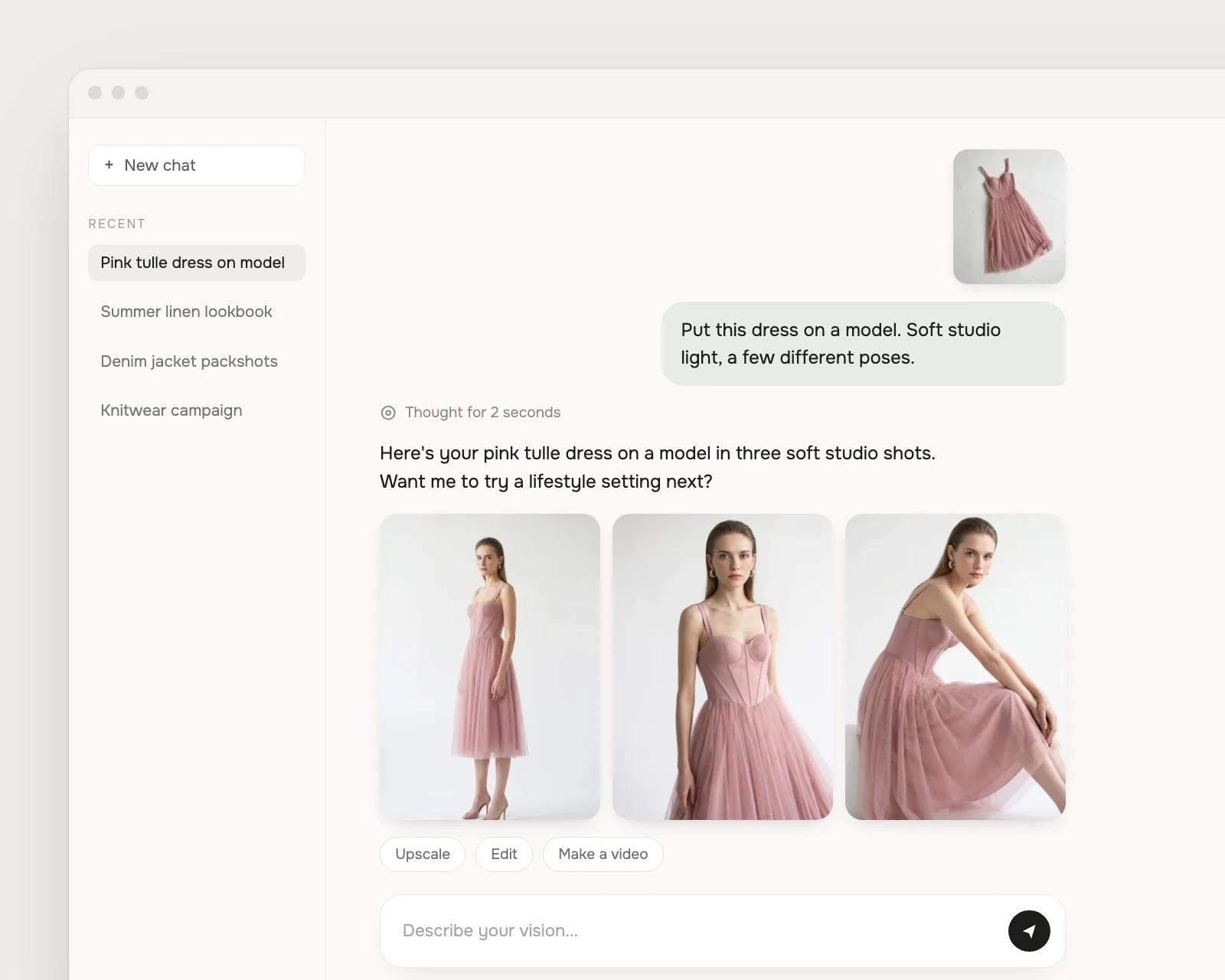
Best in this category: FASHN. You get more control over pose and setting, and 4K on every plan.
Editing photos you already have
This is where the two differ most. Both can dress a real person in a new product: FASHN with Try-On, Photoroom with Virtual Try-On. FASHN's Try-On also covers shoes, bags, hats, and jewelry.
FASHN adds Model Swap, which keeps the outfit, pose, and lighting and changes the person, and Face Swap, which changes only the face. Photoroom has no tool for this. Both can change a pose or camera angle from a prompt, with FASHN's Edit or Photoroom's Edit with AI.
To keep one model across your catalog, both work from a single photo. FASHN calls it a face reference and includes it on every plan. Photoroom saves custom models to your Brand Kit, and how many you can keep depends on your plan.
Best in this category: FASHN. Both do try-on and prompt edits, but only FASHN can swap the model or the face.
Video
Both make real AI video, with the model and the fabric moving, not slideshows of stills.
Photoroom's Video Generator works from templates. There are more than 300, including fashion templates that apply preset model moves and camera motion. It needs the Max or Ultra plan.
FASHN turns one image into a 5 or 10-second clip. You can describe the motion yourself, set the final frame with an end image, or let the Agent plan it. Video is on every plan, at up to 720p on Basic and 1080p on Pro and Agency. More on Short Videos.
Best in this category: FASHN. Video is on every plan and in the API, and you can direct the motion yourself.
The API
If you're building try-on into a store or an app, both have an API, but they're packaged differently.
Photoroom's API has two parts. Background removal costs $0.02 an image, which is hard to beat. One Image Editing endpoint, at $0.10 a call, covers virtual models, try-on, ghost mannequin, and flat lay. Results come out at 1K. 2K, 4K, and video need an Enterprise contract, which starts at 200,000 images a year. There's a free sandbox with watermarked results, but no official SDK.
The FASHN API is fashion only: try-on, product to model, model swap, edit, reframe, background removal, and image to video, all with the same request format. Credits cost $0.075, a try-on starts at 1 credit, and you get 4K and video without a contract. There are official TypeScript and Python SDKs. There's no free tier, so you start with a $7.50 purchase.
Best in this category: FASHN for fashion images. For background removal alone, Photoroom's $0.02 per image is cheaper.
Pricing
Photoroom is cheaper to start. At the top of the range, both cost $99 a month.
| Plan | FASHN | Photoroom |
|---|---|---|
| Entry | Basic, $19/mo. 200 credits, images up to 4K, video up to 720p | Pro, $12.99/mo. Fashion images at 1K, no video |
| Middle | Pro, $49/mo. 750 credits plus 50 a day, video up to 1080p | Max, $34.99/mo. Up to 185 fashion images at 2K, video |
| Top | Agency, $99/mo. 1,500 credits plus 100 a day | Ultra, $99/mo. Up to 310 fashion images at 4K |
| Yearly | The price of 10 months | Pro $89.99, Max $250, Ultra $990 |
| To try it | 10 free credits | Free plan for non-commercial use, or a 7-day trial on yearly Pro and Max |
At $99, FASHN Agency's monthly credits cover about 500 images at 4K in the highest quality mode, at 3 credits each, before the 100 bonus credits it adds every day. Photoroom Ultra includes up to 310 fashion images at 4K. See our pricing page for full details.
Best in this category: Photoroom to start, FASHN for 4K. Photoroom's entry plan is cheaper, but only FASHN includes 4K images and video from its first plan.
Where FASHN is the better choice
If the clothes are what you're selling, these are the reasons to pick FASHN.
- 4K and video on every plan. Both are included from $19 a month. Photoroom keeps 4K for Ultra and video for Max and Ultra.
- Reusing photos you already have. Try-On, Model Swap, and Face Swap change the clothes, the person, or just the face without a reshoot. Photoroom has no model swap.
- Directing the shot. Describe any pose or setting, or add a reference photo, instead of choosing from presets.
- Accessories and full looks. Try-on and on-model images cover shoes, bags, hats, eyewear, and jewelry, with up to three products in one look.
- A fashion API without a contract. 4K and video through the API from $0.075 per image, with official TypeScript and Python SDKs. Photoroom needs an Enterprise contract for both.
- Privacy by default. Your uploads aren't used to train AI models unless you opt in. In Photoroom's app, each team member has to opt out.
Where Photoroom is the better choice
Photoroom covers far more than fashion, and for some teams that matters more than anything above.
- Mixed catalogs. If you sell candles as well as clothes, one tool for everything is simpler.
- Cutouts at volume. Background removal is included on every paid plan, and it costs $0.02 an image through the API.
- Batch work. You can run the same settings on up to 250 images at once.
- Shopify. Its app imports your products and publishes edited images back as drafts, on Max and above. FASHN connects to Shopify only through the API.
- Large teams on a budget. Every paid plan includes up to 50 seats. FASHN plans include 2 to 10.
- Design work. Templates, a Brand Kit, and a logo maker. FASHN has none of these.
Privacy and support
Photoroom's privacy policy says images you upload to its app can be used to train its models, unless you switch this off under Data control in your account settings. The setting is per person, so each team member has to turn it off. Images sent through its API aren't used for training. FASHN doesn't train on your uploads or results, in the app or the API, unless you opt in through a separate agreement.
For help, Photoroom offers in-app chat, a help center, and a community forum. It doesn't publish a support email for app users, and Enterprise customers get a customer success manager. At FASHN, the Help Center has step-by-step guides for every tool, paying customers can chat with our team in the app, anyone can email [email protected] or ask in Discord, and enterprise teams can get a shared Slack channel.
Best in this category: FASHN. Your app uploads stay out of AI training by default, and anyone can reach support by email.
Switching from Photoroom
You don't need to reshoot anything. Flat lays, ghost mannequin shots, hanger shots, and on-model photos all work in FASHN. If you use a custom model in Photoroom, upload the same face photo as a face reference, as long as you have the person's consent.
New accounts get 10 free credits, so you can run a few of your best sellers through the Agent and compare the results before you pay. On the API, send your product image to the run endpoint with the model name product-to-model. The docs have quickstarts for both SDKs.
Common questions
Still have questions? Visit our Help Center
Photoroom is a trademark of its owner. FASHN isn't affiliated with Photoroom.
Ready to take control of your
fashion content?
Join thousands of brands and creators using FASHN AI to create premium product imagery in seconds.

