
FASHNAI
Wat is er nieuw bij FASHN AI
Een gedetailleerde geschiedenis van updates, verbeteringen en fixes aan ons product. Blijf op de hoogte van onze nieuwste functies en verbeteringen.
[App] Transparent Backgrounds in the FASHN Agent
The FASHN Agent now works with transparent backgrounds across generation, editing, removal, and upscaling.
Transparency goes beyond cutting out the subject. Sheer materials such as tulle, lace, and mesh are generated semi-transparent, so the backdrop you place behind the image shows through the fabric.
- Transparent generation: Request transparency directly, such as "create a model on a transparent background" or "put this hoodie on a model, with a transparent background."
- Edits keep transparency: Changes to an image that is already transparent, such as "make her t-shirt red," keep the transparent background.
- Background removal: Ask the Agent to "remove the background" or "cut out the model" on an upload or on an image from earlier in the conversation. The result is a transparent PNG at the same size as the source.
- Upscaling keeps transparency: Transparent images stay transparent when upscaled, up to 4K.
Results appear in the chat and are saved to your Gallery as PNG.
[App] FASHN Agent Upgrade: Better Accuracy and Up to 6 References
The FASHN Agent now works more closely with our image generation, so it follows your references more faithfully and keeps quality steady across a conversation.
- Better product accuracy: Garments and products keep their details more reliably in every result.
- Model consistency by default: The same model keeps their face and look across every image in a conversation.
- Face reference for all plans: Use a face reference in the Agent on any plan.
- Up to 6 image references: Combine more inputs in a single request.
- Complex multi-image instructions: Give each image a role, such as "put this product on this face, in this pose, against this background."
- Stronger multi-turn edits: Follow-up adjustments keep the quality of the original image.
The Agent works best with image references, so try pairing your uploads with poses, backgrounds, and models from Elements.
[App] Meet Radar: Your Brand in AI Search
Radar is our upcoming tool for understanding how your brand appears in ChatGPT and Google AI Overview. Brand profiles and query setup are now available:
- Brand profile: Your website, brand description, audience, and competitors provide context for future analysis.
- Queries: Up to 10 active queries capture the questions that matter to your brand, such as “What are the best brands for wedding guest dresses?”
- Markets and channels: Each query has its own country setting and can cover ChatGPT, Google AI Overview, or both.
This first release focuses on setup. Results, insights, and reports are coming soon. Queries are currently supported in English, with more languages to follow.
[App] Unused Monthly Credits Now Roll Over
Unused app monthly credits no longer reset at the end of your billing cycle. They now roll over and accumulate, up to a maximum balance based on your plan.
- Max Balance by Plan:
- Basic: up to 600 credits (200/month × 3)
- Pro: up to 2,250 credits (750/month × 3)
- Agency: up to 4,500 credits (1,500/month × 3)
- Agency 2×: up to 9,000 credits (3,000/month × 3)
[App] FASHN AI Is Now Available on Android
FASHN AI is now available on Android, joining our existing iOS app. You can now create product images, models, and videos from your phone on both major mobile platforms.
- Chat-based creation: Describe what you need and the FASHN AI Agent runs the appropriate workflow.
- Complete creative toolkit: Access virtual try-on, Product to Model, model creation, image editing, background removal, video generation, and more.
- Cross-platform sync: Your FASHN account, credits, Gallery, and Collections stay available across Android, iOS, and the web.
Download FASHN AI:
[App] Organize Your Gallery with Labels
You can now add Labels to your generations to keep your Gallery and Collections organized.
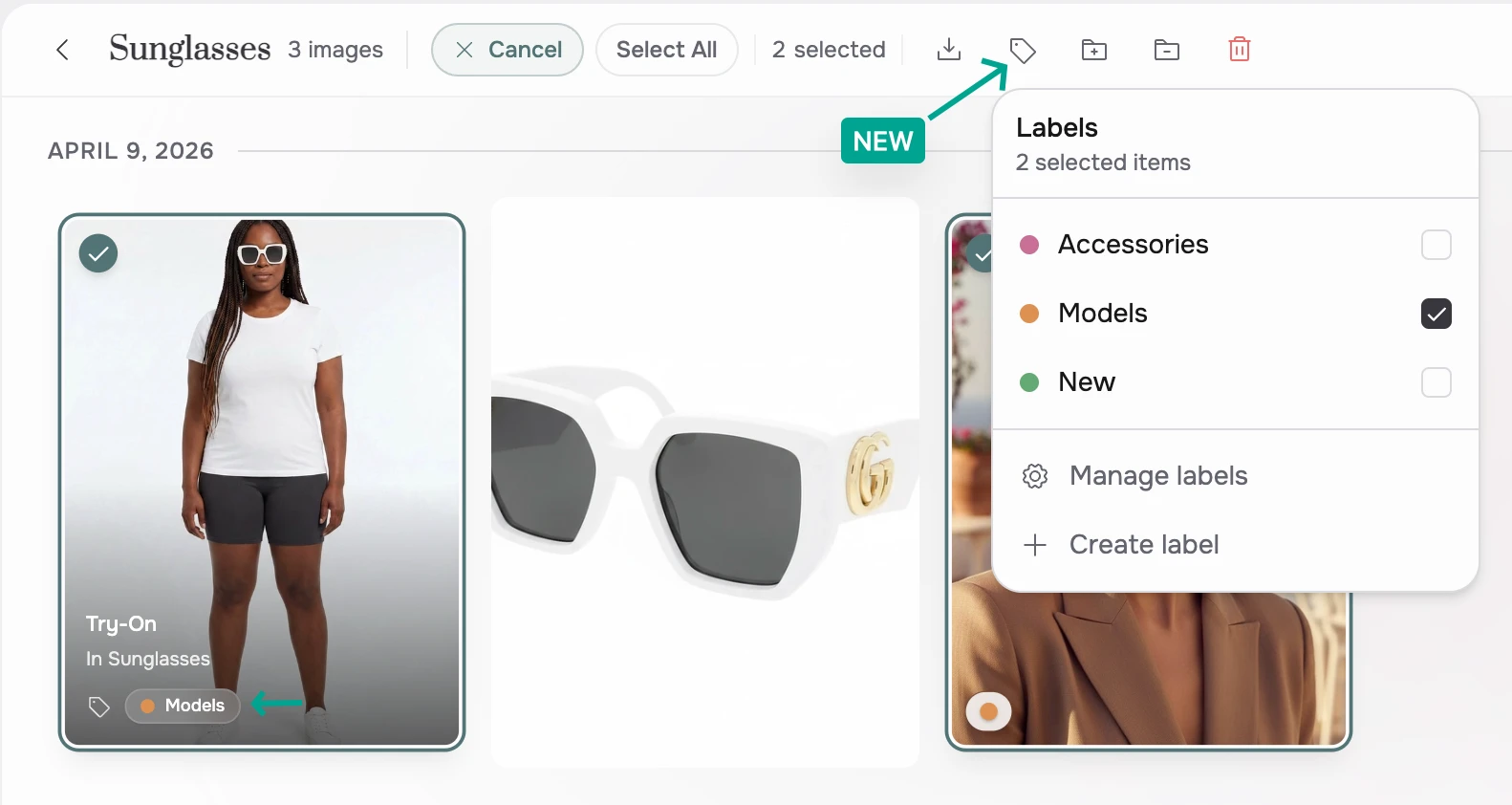
- Label Generations: Assign one or more labels to any generation in your Gallery or inside a Collection.
- Filter by Label: Quickly find images by filtering your Gallery or Collection view by label.
[App] Create with the Agent Directly from Gallery
Gallery now includes the Agent prompt for creating content. It supports the same prompt controls as the Agent, including attachments, reference images, and generation settings.
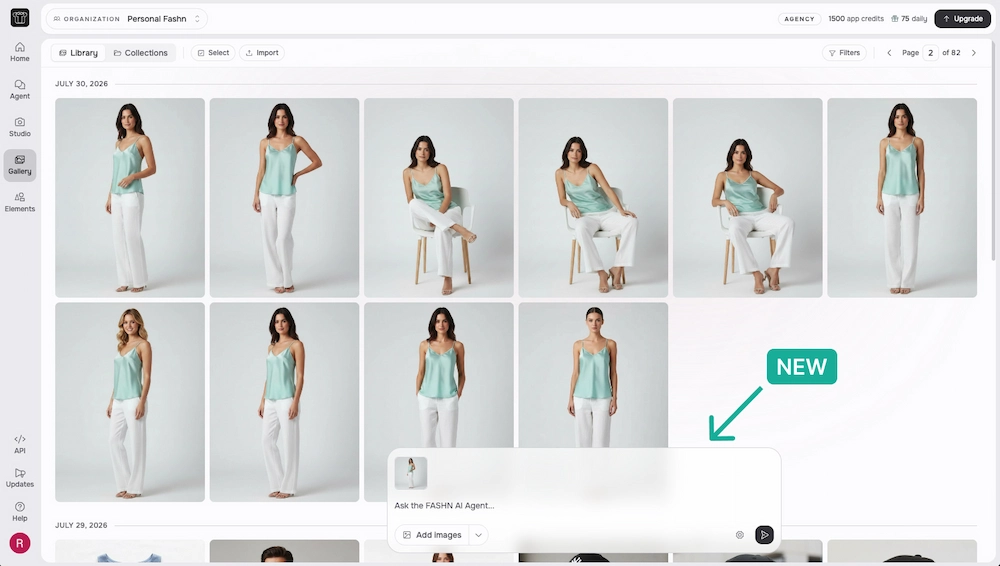
Prompts submitted from Gallery use the existing Agent experience. The latest response and generated media are shown above the prompt, and generated media are added to Gallery.
Gallery images can also be dragged into the prompt and used as references.
[App] Agent Image History: Quickly Revisit Any Image in Your Session
The Agent now shows your session's image history alongside the chat: a scrollable strip of every image in the current conversation, your uploads and the Agent's generations alike, in order.
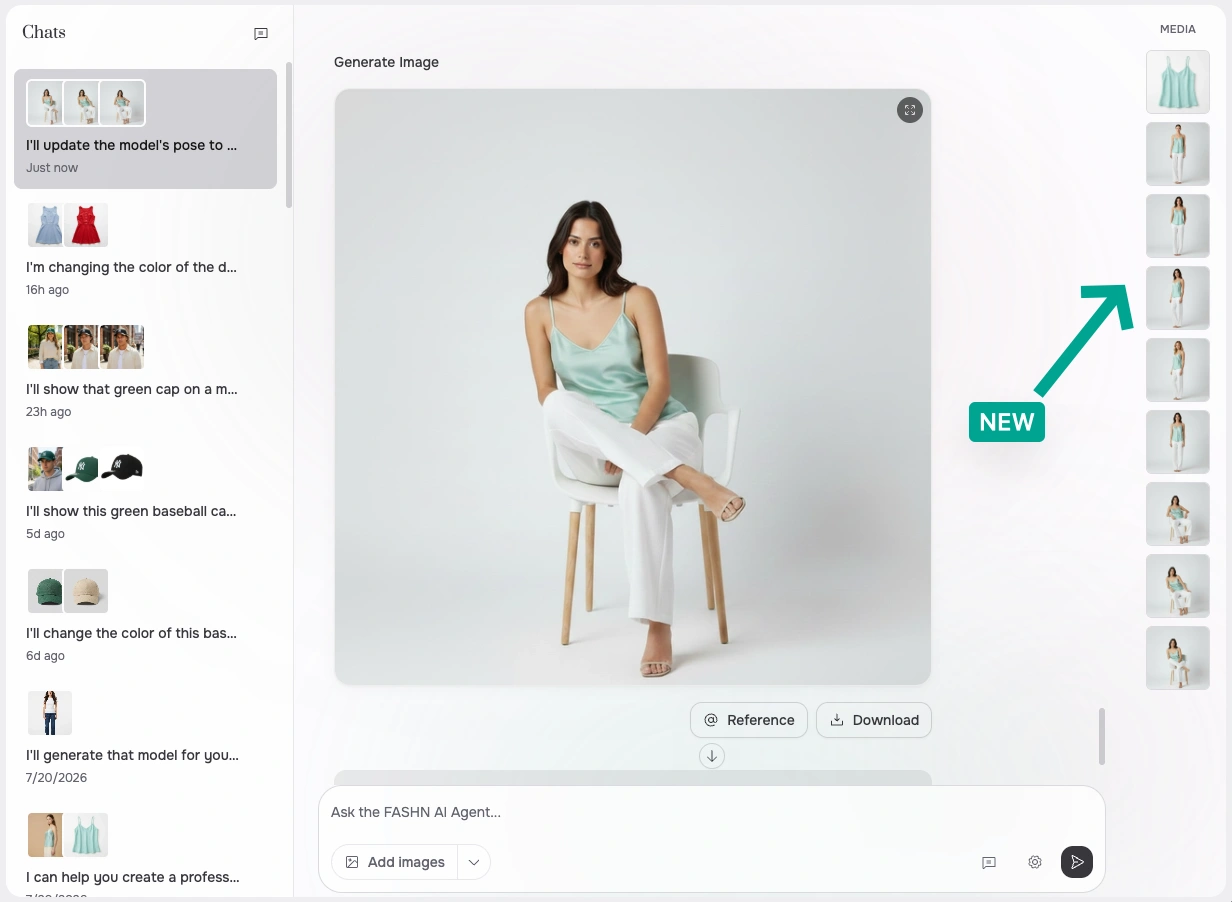
Click a thumbnail to jump straight to where that image appears in the conversation, or click its @ button to reference it in your next prompt.
[App] Reference Any Chat Image with @ Tags in the Agent
Type @ in the Agent's message box to reference any image already in your conversation. A picker opens with the images from the current chat, grouped into your inputs (uploads, Gallery picks, and Elements) and previous generations.
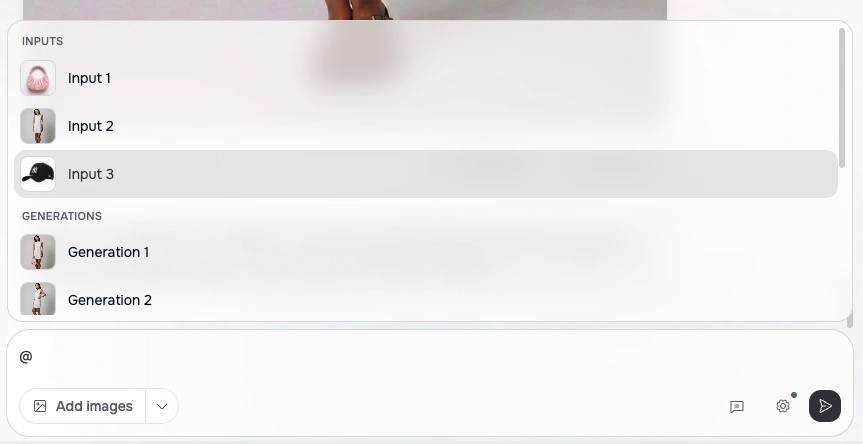
Selected references appear as thumbnail chips in your prompt, such as @input1 or @generation2, so an instruction like "put the jacket from @input2 on @generation1" stays short and unambiguous.

There's no need to re-upload or describe an image the Agent has already seen, which makes multi-step edits across a long conversation much easier.
[App] Elements: A Built-In Library of Creative Assets
Elements is a growing library of creative assets built directly into FASHN: curated models, portraits, poses, photography styles, backgrounds, clothing, accessories, and more.
You can open Elements from any image upload component in the Studio or the Agent, or browse the full library on its dedicated page and send the assets you want to work with straight to the Agent.
Mix and match Elements with your own uploads and generations to create exactly what you have in mind. Paid plans unlock the full library.